bind(f, _2, _1)| RSS | GitHub |
Lazy evaluation is deferred execution. Lazy evaluation takes a function and some arguments, and returns a function object that is capable of executing the given function at a later stage.
This first article in a series on lazy evaluation using bind expressions covers the preliminaries. Subsequent articles explores topic such as lazy operators, lazy functions, expression templates, and differentiation of lazy expressions.
Bind expressions are created by passing a function to
std::bind.
So we start by understanding how operators or overloaded functions can be
passed as arguments to other functions.
A function can be passed as argument to another function.
Besides std::bind there are plenty of examples in the standard library
that takes functions as arguments, such as
std::apply,
std::visit,
std::function,
or std::thread.
We use std::apply to find the largest element of a pair as an example.
std::apply is called with a function and a tuple, and invokes the function with
the tuple elements as function arguments.
std::max is an
obvious choice for the function.
result = std::apply(std::max, pair_object); // Fails: Unresolved overloadPassing the function template std::max as an argument fails due to overload resolution.
Passing a function as an argument is done by passing the address of the function.
Overloaded functions and function templates are really many functions that each
have their own unique address, and the compiler asks us to choose which one.
We can choose a specific overloaded function by selecting the address ourselves. This can be done by casting the overloaded function to the appropriate function signature.
result = std::apply(static_cast<const int& (&)(const int&, const int&)>(std::max),
                    pair_object);
This uses a complicated syntax that only works for one type.
If the postfix-expression is the address of an overloaded set, overload
resolution is applied
-- C++ Standard N4950, section [over.match.call.general]
The underlying problem is that passing an overloaded function as argument
causes overload resolution to kick in prematurely. We would like to defer
overload resolution until std::apply invokes the function with
the two pair elements, at which time the overloaded function can be
deduced with with the actual function parameters.
As an aside, suppose that we want to add the two pair elements rather than
choosing the largest element, then we would like the use operator+.
result = std::apply(operator+, pair_object); // Fails: No addressThis does not work because we cannot take the address of a built-in operator,
and even if we could, we would have the same problem with overloading as
before. The standard has long acknowledged this problem and provides a
function object wrapper for some operators. We can therefore use
std::plus
instead.
We ignore the minutiae of transparent function objects as they
are merely a historical accident.
result = std::apply(std::plus{}, pair_object);
In places where one would expect to pass a pointer to a function to an
algorithmic template, the interface is specified to accept a function object.
This not only makes algorithmic templates work with pointers to functions,
but also enables them to work with arbitrary function objects.
-- C++ Standard N4950, section [function.object.general]
std::plus works because it is a function object,
and std::max fails because it a function template.
Let us wrap std::max as a function object.
The function object is defined as an inline variable of a non-template class
with a template call operator.
inline constexpr struct
{
  template <typename... Args>
  constexpr auto operator()(Args&&... args) const
  {
    return std::max(forward<Args>(args)...);
  }
} my_max{};
This function object can be used with std::apply
result = std::apply(my_max, pair_object);

// becomes
result = my_max(pair_object.first, pair_object.second);

// which becomes
result = std::max(pair_object.first, pair_object.second);
The function object is an object, so the first argument for std::apply above
is an object, not the address of an overloaded function.
When the internals of std::apply invokes the object as a function, it uses
the my_max call operator with the pair elements, which calls std::max and
triggers overload resolution.
Using function objects therefore gives us a mechanism to defer overload
resolution until needed.
We can also pass lambda expressions as function arguments, because lambda expressions are essentially function objects.
auto my_max = [] (auto lhs, auto rhs) { return std::max(lhs, rhs); };

result = std::apply(my_max, pair_object);

// becomes
result = my_max(pair_object.first, pair_object.second);

// which becomes
result = std::max(pair_object.first, pair_object.second);The standard library contains several facilities for creating function objects that binds functions and arguments together.
std::bind_front
is used for partial application.
It returns a function object that binds an underlying function and some arguments
(bs...).
When the resulting function object is invoked with additional arguments (as...),
the underlying function is called with the bound arguments followed by the
additional arguments.
auto g = bind_front(f, bs...);// Usage
auto result = g(as...);
// becomes
auto result = f(bs..., as...);std::bind_back works in the same way, except the underlying function is called
with the additional arguments followed by the bound arguments.
auto g = bind_back(f, bs...);// Usage
auto result = g(as...);
// becomes
auto result = f(as..., bs...);Both of these functions return function objects, but not bind expressions.
Those come from std::bind.
Before you declare bind expressions an arcane construct that has been replaced by lambda expressions, please indulge me for a while. Bind expressions have an untapped potential that we shall return to later on.
std::bind returns a
bind expression, which is a function object that binds an underlying function
and some bound arguments (bs...).
Invoking the bind expression with additional arguments (as...) calls
the underlying function with the bound arguments, not the additional arguments.
The bound arguments may or may not be transformed first using the additional
arguments.
This is an important distinction from partial application in the previous section.
auto g = bind(f, bs...);// Usage
auto result = g(as...);
// becomes
auto result = f(T_a(bs)...);where T_a(bs)... denotes the transformation of the bound arguments (bs...)
using the transformation arguments (as...).
The transformation can be one of the following four.
Normal arguments are bound by copy and are not transformed.
An example using normal arguments
int value = 42;
auto g = bind(f, value);

auto result = g();
// becomes
result = f(42);
Bound arguments are equivalent to lambda capture by copy.
int value = 42;
auto g = [value] () { return f(value); };

auto result = g();
// becomes
result = f(42);Binding by reference is done using std::reference_wrapper.
References are not transformed.
int value = 42;
auto g = bind(f, ref(value));

// value could be changed here

auto result = g();
// becomes
result = f(value);
Bound references are equivalent to lambda capture by reference.
int value = 42;
auto g = [&value] () { return f(value); };

auto result = g();
// becomes
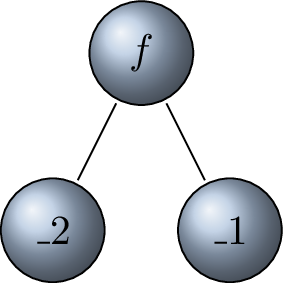
result = f(value);Bind placeholders are denoted _N, where N is a literal integer value.
Placeholder _N will be substituted by the Nth transformation argument.
Placeholders use one-based indexing, so placeholder _1 refers to the first
transformation argument.
|
bind(f, _2, _1) |
An example using placeholder substitution
using namespace std::placeholders;

auto g = bind(f, _2, _1);

auto result = g(a, b);
// becomes
//   _1 is substituted with a
//   _2 is substituted with b
auto result = f(b, a);
The using statement brings the placeholder symbols into the current scope so
we can refer to them as _1 rather than std::placeholders::_1.
All further examples silently assume that this has been done.
Placeholders are equivalent to lambda parameters.
auto g = [] (auto arg1, auto arg2) { return f(arg2, arg1); }

auto result = g(a, b);
// becomes
auto result = f(b, a);
Nested bind expressions are injected into the enclosing bind expression.
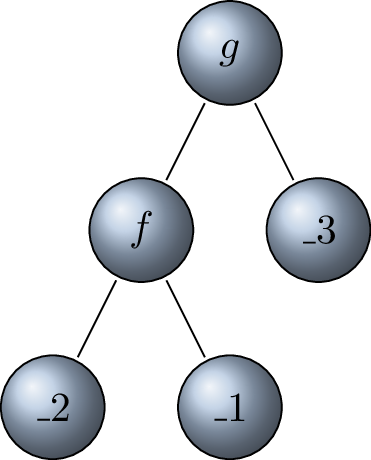 |
bind(g, bind(f, _2, _1), _3) |
An example using nested bind expressions
// bind expression
auto g = bind(f, _2, _1);

// nested bind expression
auto h = bind(g, _3);
// becomes
auto h = bind(bind(f, _2, _1), _3);

auto result = h(a, b, c);
// becomes
auto result = f(b, a, c);
There is no direct analogy of nested bind expressions in lambda expressions. Nested bind expressions gives us the ability to build expression trees.